Monday, December 05, 2011

CLEAR STOCK BEFORE PRICE INCREASE- GRAB IT RM1890

Acer Aspire AS4752G-2432G50 14" Notebook

Intel® Core™ i5-2430M Processor-2.4GHz  
2GB DDR3 RAM, 500GB SATA HDD  
NVIDIA® GeForce® GT 520M

OS: Genuine Windows® 7 Home Premium 64-bit
COLOR ONLY ELEGANT BROWN AVAILABLE
ACER MALAYSIA 3 YEAR WARRANTY 
CHECK ONLINE
RM1890


Force feedback
Force feedback
Force feedback
Force feedback

check the actual product video on youtube
http://www.youtube.com/watch?v=eF__zJeUoQc

Promotional (Nokia Bluetooth Headset )

Nokia Bluetooth Headset BH-503 Description
The Nokia BH-503 - for excellent audio quality, great wear ability and laid-back design, lets you lose yourself in the music knowing you won't miss a call.
With a Nokia Bluetooth Stereo Headset BH-503 you can
Enjoy high-quality stereo sound streamed from your compatible phone
Stay comfortably in style with over the ear design and an easygoing neckband
Control the music player and manage your calls with the media keys

Specifications :
BH-503 Bluetooth Headset
Chipset: CSR/BC352239A
Bluetooth version: version 2.0/class2
Operating distance: 10m
Range of frequency: 2.4 to 2.4835GHz ISM band
Operating range: up to 10m
Typical talk time/ music : more than 10 hours
Typical standby time: 160 hours
Rx sensitivity: ≤80dBm (per 1%)
Rechargeable lithium battery: 160mAh
Compatible with various Bluetooth enabled devices such as mobile phones,
PDAs, and laptops,MP3/4/5,and so on

Package Included:
1 x New OEM BH-503 bluetooth headset
1 x Charger
1 x User Manual(English)


RM85

Saturday, November 19, 2011

Hard disk (internal and external) Price Up!!!!

Bad News to all ... Due to the Flood in Thailand the price for some IT Product rise very high to 50% and more.. Check below (statement from theStar).


PETALING JAYA: It's “hard” news for those looking for new computers and laptops prices have risen due to a shortage of hard disk drives (HDD) following the floods in Thailand.
Power outages and flooded facilities at more than a dozen factories in the country have driven the price of computers up by at least RM100 in just two weeks.
Thailand is the world's largest manufacturer of HDD, accounting for nearly half the world's needs. HDDs are the storage component of desktop computers and laptops.
A check with several IT outlets here showed that the price of external hard drives had also increased drastically.
Carter Chan, a sales supervisor of an outlet at Low Yat Plaza in Kuala Lumpur, said the price of all products related to HDDs had increased due to the floods.
“The price of external hard disks has either doubled or tripled, depending on the brand,” he said, adding that sales had been affected due to the sudden increase.
Lim Chooi Chin, a computer outlet director at the PJ Digital Mall here, said the price of almost all brands of desktop computers had increased by about RM100.
A computer accessory shop operator, who only wanted to be known as Saw, 40, also said HDD prices had increased since the floods.
“Prices of hard disks is about RM100 higher compared to prices a month ago. For example, a 1TB hard disk, which was RM280, now costs about RM390,” she said, adding that prices of desktop computers had increased by about 5%.
International market research company IDC Malaysia said the shortage would have a direct impact on worldwide computer shipments through the first half of next year.
“The full extent of the damage to the HDD factories will not be known until the floodwaters recede, al-though it is already clear that there will be HDD supply shortages,” it said in a statement yesterday.
The firm estimated that the industry's total computer shipments could drop by more than 20% in the first quarter of next year.

Tuesday, October 04, 2011

October's Promotion (Updated)

 
 Acer Aspire AS4755G-2432G50 
New GLOSSY GREEN

- Intel Core I5 -2430M 2.4GHz
- 14" led , DVDRW, Bluetooth,
- 500GB SATA HDD 
- NVIDIA® GeForce® GT 540M 1GB VRAM
- 2GB DDR3 RAM memory 
- Windows 7 Home Premium 64 bit
- 3 year warranty
RM1890 Out of stock


Acer Aspire AS4752G-2332G50 
New GLOSSY COPPER

- Intel Core I3 -2330M 2.2GHz
- 14" led , DVDRW, Bluetooth,
- 500GB SATA HDD 
- NVIDIA® GeForce® GT 520M 1GB VRAM
- 2GB DDR3 RAM memory 
- No OS
- 1 year warranty
RM1560 Out of stock

Acer Aspire AS4755G-2414G64 
New MAROON

- Intel Core I5 -2410M 2.3GHz
- 14" led , DVDRW, Bluetooth,
- 640GB SATA HDD 
- NVIDIA® GeForce® GT 540M 2GB VRAM
- 4GB DDR3 RAM memory 
- Windows 7 Home Premium 64 bit
- 3 year warranty
- Free Yes Dongle
- Free Trend Micro Titanium
RM2290 Out of stock

Acer Aspire AS4755G-2434G50
New MAROON

- Intel Core I5 -2430M 2.4GHz
- 14" led , DVDRW, Bluetooth,
- 640GB SATA HDD 
- NVIDIA® GeForce® GT 540M 2GB VRAM
- 4GB DDR3 RAM memory 
- Windows 7 Home Premium 64 bit
- 3 year warranty
RM2190 Out of stock


Acer Aspire AS4349-B801G50 
New
- Intel® Celeron B800 Processor 1.50 GHz
- 14" led , DVDRW, Bluetooth,
- 500GB SATA HDD 
- Intel(R) HD Graphic
- 1GB DDR3 RAM memory 
- No OS
- 1 year warranty
RM1099 price up
Acer Aspire 4750Z-B942G50L 
New Processor - Price Drop
- Intel Pentium B950 2.0GHz
- 14" led , DVDRW, Bluetooth,
- 500GB SATA HDD 

- Intel(R) HD Graphic
- 2GB DDR3 RAM memory 
- No OS
- 1 year warranty
RM1265 Out of stock

 
Asus A43SJ Color Series   
New Processor
- Intel® Core™ i3-2330M 2.1 GHz
- 14" led , DVDRW, Bluetooth,
- 500GB SATA HDD 
- NVIDIA® GeForce® GT 520M 1GB VRAM
- 2GB DDR3 RAM memory 
- Windows 7 Home Premium 64 bit
- 2 year warranty
RM1880
Acer Aspire One Happy 2   
Price Drop

- Intel® Atom™ N570 Processor
- 1.66GHz, 1MB L2 Cache
- 500GB SATA HDD
- 2GB DDR3 RAM memory
- Dual OS Windows 7 Starter & Android
- 1 year warranty
RM1099 Price Up
Acer Aspire One D257-N57DQkk  
Price Drop
- Intel® Atom™ N570 Processor
- 1.66GHz, 1MB L2 Cache
- 320GB SATA HDD
- 1GB DDR3 RAM memory
- Windows 7 Starter
- 1 year warranty
RM898
Toshiba Mini Series NB520  
Valued Buy
- Intel® Atom™ N570 Processor
- 1.66GHz, 1MB L2 Cache
- 320GB SATA HDD
- 2GB DDR3 RAM memory
- Windows 7 Starter
- 1 year warranty
RM998 Out of stock

Friday, September 30, 2011

TIPS penggunaan Canon Pixma MP258 CISS (Incomplete yet)


PANDUAN RINGKAS  PENGGUNA CANON PIXMA WITH CISS
1-  1- Pastikan panel memaparkan 1 (jika 2/3/ 4/5/6/7/8/9 / F juga tak mengapa) apabila suis on telah di tekan

                                                 Rajah 1  
Rajah 2


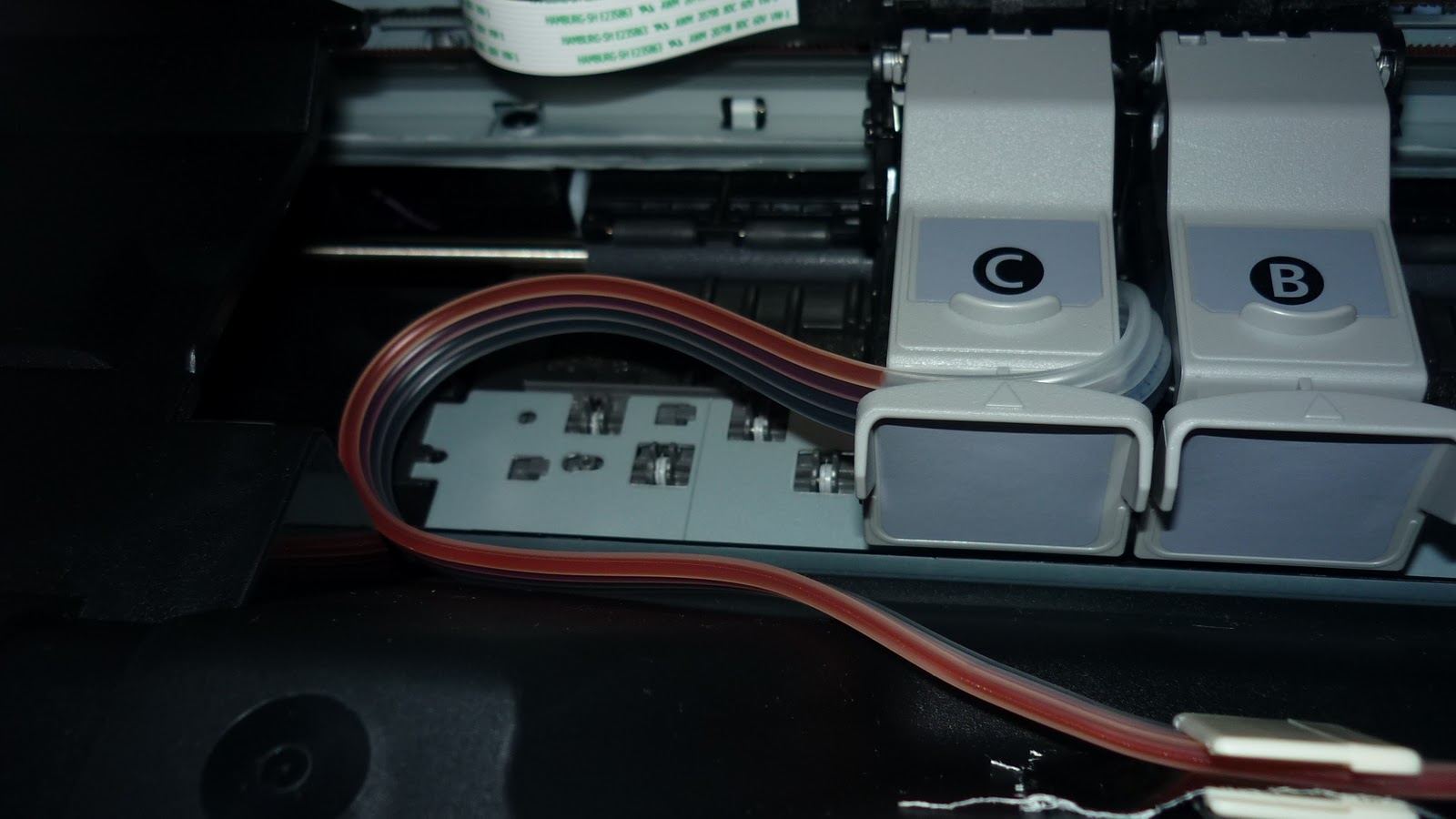
2-  Jika panel keluar paparan lain cthnya E , angkat dan buka penutup untuk check keadaan kartrij. Rajah 2 menunjukkan penggunaan pita pelekat bagi menghalang salur getah terkeluar lalu tersangkut. Rajah 3 menunjukkan salur getah yang t

Rajah 3


Rajah 4


      3-  Rajah 4 merupakan kaedah kedua pemasangan salur getah. Rajah 4 juga menunjukkan jarak (panjang) salur yang sesuai dari pencengkam salur ke kartrij. Jika terlalu panjang tersangkut jika pendek kartrij jammed juga menghasilan Error , E pada panel.

A- Printer  Panel papar 1 selepas suis on ditekan tetapi bila print atau fotostat keluar Error E, 1, 6.


1-       Jika masalah ini muncul sedangkan ink masih byk , biasanya kerana Printer tidak recognize ink yang baru dari salur getah CISS (tank). Cara penyelesaian mudah hanya tekan butang reset dalam 10 saat.
2-       Jika dua kali message muncul ulang reset lagi dalam 10 saat. Printer akan bypass lalu mencetak.

      B-Ink dalam salur tidak gerak .   


                                                                                                                                                                                       Rajah 8
Rajah 7
1-       Sekiranya kes dalam rajah 7 berlaku jangan angkat tank untuk menggerakkan ink. Ini memaksa dan menyebabkan overflow. Langkah  terbaik ialah  menggunakan function deep cleaning  1-4 kali pada bahagian maintenance.
2-       Deep cleaning akan menyedut ink dan menggerakkanya.
3-       Step untuk membuka deep cleaning pada windows 7 ialah :
Klik Device Printers, klik kanan pada printer (cth MP250), Klik pada Printer Properties,Klik Maintenance.
4-       Step untuk membuka deep cleaning pada windows XP ialah :
Klik Printers and Faxes, klik kanan pada printer (cth MP250), Klik pada  Properties,Klik Maintenance.

C-Kualiti Printing tak cantik .
1-       Jika ini berlaku langkah penyelesaian utama ialah sama seperti langkah 3 dan 4 dalam problem Ink Dalam Salur Tak Gerak.
2-       Cuma dalam kes ini kita seharusnya melaksanakan Cleaning beberapa kali .
3-       Pengujian printing ialah dengan klik pada print test page ( di bahagian General) atau Print check Patern dan Nozzle Check.
4-        jika masih tidak cantik hasil printing baru pilih deep cleaning.
5-       Bahagian mata katrij perlu dilap dengan tisu lembut jika deep cleaning telah dilaksanakan beberapa kali.

D-Printer  Panel papar 1 selepas suis on ditekan tetapi bila print atau fotostat keluar Message PRINTER IS OFFLINE.


Rajah 9
1-       Biasanya berlaku kerana printer tidak di Set as Default
2-       Step untuk membuka deep cleaning pada windows 7 ialah :
Klik Device Printers, klik kanan pada printer (cth MP250), Klik pada Set As Default.
3-       Step untuk membuka deep cleaning pada windows XP ialah :
Klik Printers and Faxes, klik kanan pada printer (cth MP250), Klik pada Set As Default.
4-       Printer berkenaan akan bertanda ( betul )
5-       Sekiranya printer telah set as default tapi masih OFFLINE cuba On dan Off printer.
6-       Jika gagal juga , mungkin driver perlu di REINSTALL.

PENTINGNYA LOCK DAN UNLOCK CISS serta penutup lubang udara CISS.
P1000303.JPG


P1000187.JPG


Rajah 10                                                                                    Rajah 11

1-       Jika Printer mahu digunakan terlebih dahulu lock mesti telah UNLOCK dan lubang udara dibuka.
2-       Jika Printer disimpan dan tidak diguna lubang udara mesti ditutup. Lock boleh dibiarkan UNLOCK .  JIka terlalu lama tidak digunakan lock mesti dalam keadaan LOCK.
3-       Sewaktu Melaksanakan semua troubleshoot A-D  pastikan Lock telah UNLOCK dan lubang udara telah dibuka.
P1000302.JPG


Rajah 12 ( lubang udara terbuka)